Download Just Money manager: Expense Budget Bills Receipts free on android
APK file Just Money 0.9.7How to install APK / APKS / OBB file on Android
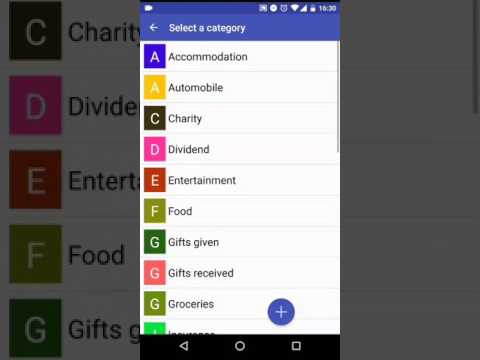

A simple & easy to use money manager app to tracking your expenses, bank accounts, transactions, cash balance, spending budget, store receipt photos and attachments, bills reminder & payments, recurring transactions / bills and many more.
With integrated Google Drive backup your data including receipt photos & attachments are regularly backed up onto the cloud storage. So you will never lose your data, receipts attached, even when you change your device.
Available in Dutch, English, Spanish, French, German, Hindi, Polish, Portuguese, Russian & Thai languages.
Download now to experience the personal assistant and book keeping software that support multiple profiles, meaning you can manage your individual, household and business cash flow with-in this single Apps and independent from each other.
Features:
* Add expenses and income
* Accounts
* Budget planner
* Fund transfer between accounts
* Categories and subcategories
* Integrated exchange rate, with multiple currency transfers
* More than 160 currencies supported
* Auto completion entries
* Multiple attachments, receipts photos
* Transactions list, with running account balance
* Search, filter & sort data
* Transaction status (void, uncleared, cleared, reconciled)
* Barcode scanner integration
* Import transactions, CSV file
* Calender view & built-in calculator
* Daily scheduled auto backup of entire app data
* Backup entire app data, including receipts captured
* Google Drive integration to backup App data
* Dashboard overview for month
* Recurring transactions: Auto creation Day, Week, Date of Month, Month, Year
* Copy, delete, reconcile multiple transactions
* Category wise monthly comparison Reports
* Professional build for tablets and phones
* This is a free trial version that can be used for unlimited days.
* Limited number of Transactions, Accounts and categories
* In-App billing for easy upgrade to premium
[$] Upgrade to premium for below features:
* Unlimited Transactions, Accounts, categories & profiles
* Advanced Budgets to support Day, Week, Month, Year
* Export & email transactions including receipt photos, for expense approval
* Dashboard overview for Day, Week, Month and Year
* Generate PDF reports
* Account balance charts and forecast
* Comparison charts, trends and many reports
* Advanced data view by Day, Week, Monty or Year
* Restore data & receipts from backup
* App Security: both PIN and Fingerprint based
* Change startup screen
* Built-in contact developer support
* Integration for Features for:
- Bills reminder
- Multiple profile support
What is an profile?
A profile is an organized collection of data, like a data storage, account books, similar to having multiple email accounts.
For example: If you have multiple businesses (business units) and like to deal with each of their expenses, categories, invoice / bill, transactions, turnover separately. Create profile for each business unit. Something like: 'my off licence shop', 'my flower shop', 'all my personal expenses'.
Permission Required:
- READ / WRITE EXTERNAL STORAGE: To store backup files, import / export transactions, save receipt photos on your phone files
- CAMERA: To take picture of your receipts / bills
- INTERNET: To check for new updates
What's Next?
* Sync data between multiple devices & web access
Special thanks to:
- Emin Feyzov, Moscow (www.citycom.ru) for help in Russian language translation.
✓ New configurable start of the week.
✓ Ability to create backdated recurring entries (past date)
✓ Enhanced calendar view and other user experience changes.
✓ Fixed budget and export transactions issue.
✓ Other defect fixes and enhancements.
- LicenseFree
- File nameJust Money
- File Version0.9.7
- Package namecom.vj.moneyat
- Size9.09 MB
- UploadedSeptember 16, 2020
- Android4.4 or later

- CategoryFinance
- Developer124APPS
- Developer sitehttp://money.124apps.com/index.html%23header5-3
- Developer emailsupport@124apps.com
- md5 hashba08db235ab4a2bbc2e2a679dfa1c48d
- Architecture-
- Permissionsshow (10)
